Skip to content
GrowthTag Solutions logoGrowthTag

Analytics & Tracking case study

GA4 Lead Tracking & Reports

A service business doesn't sell in a cart. It wins clients through form submissions, calls, emails and chats. I set up GA4 so every one of those actions is tracked, and every service page shows how much interest it really gets.

Industry
Cloud & IT services
Location
Sweden
Category
Analytics & Tracking
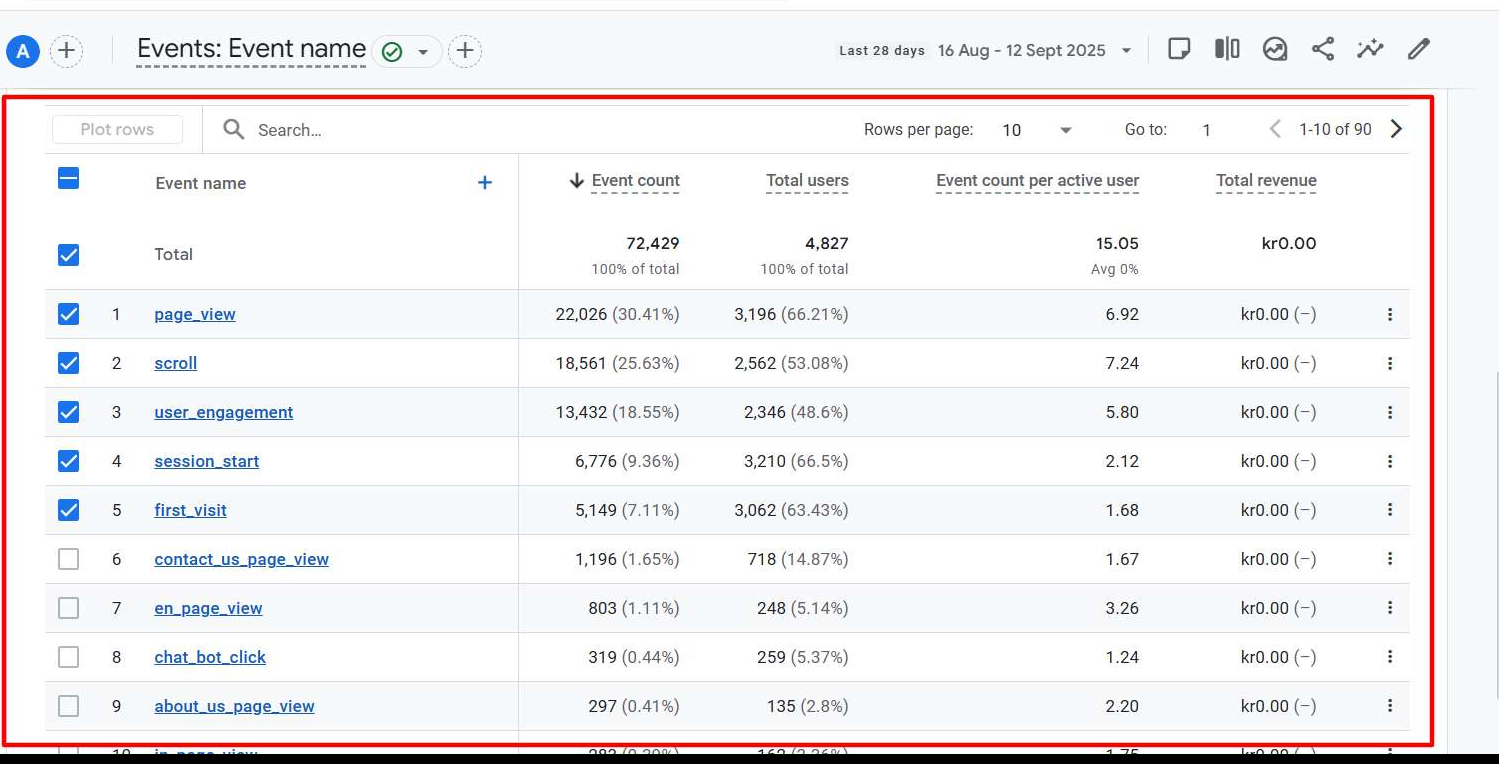
72.4K
Events tracked
90 distinct events
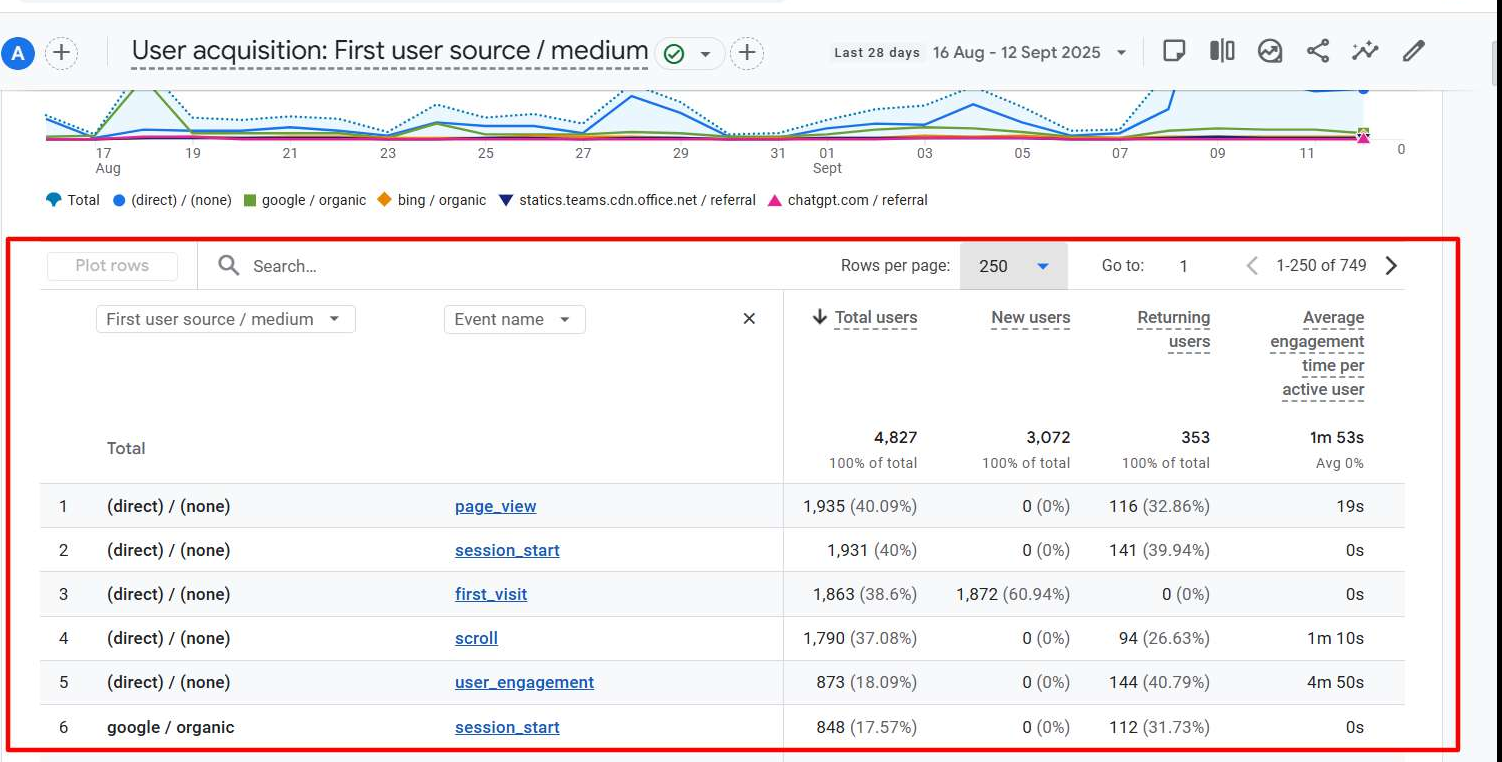
4,827
Users tracked
3,072 new users
8,333
Sessions
56.5% engagement rate
1,196
Contact page views
by 718 users

Context

Page views don't pay the bills. Leads do.

Out of the box, GA4 counts visits. It can't tell a visitor who read one blog post from one who opened your contact form, called you or asked your chatbot for a quote. Without that, you can't see which services, pages or channels bring real enquiries.

  • Lead actions

    Contact form, whitepaper form and blog form submissions, plus phone, email and chatbot clicks and contact page views.

  • Every service page

    70+ dedicated page-view events, one per service, from AWS migration to GDPR compliance — such as aws_migration_page_view or gdpr_compl_page_view. In GA4 that turns into a clear ranking of which services people actually research, without anyone having to filter URLs by hand.

  • Engagement

    Scroll depth at 25, 50, 75 and 100%, language versions and campaign landing pages.

Method

How I work

  1. 1

    Audit

    Check what GA4 records today and list every way a visitor can contact you.

  2. 2

    Build

    Set up a GTM tag for every lead action and every key service page.

  3. 3

    Verify

    Test each event in Preview and DebugView, then confirm it in GA4 reports.

  4. 4

    Report

    Hand over lead reports and a dashboard your team can use.

Proof

How I built it in Google Tag Manager, and the reports

GA4 Events report, Opsio: page views, contact page visits and chatbot clicks, Aug 16 – Sep 12, 2025
GTM, Opsio: lead and engagement tags such as phone click and scroll depth, beside campaign and compliance page views
GTM, Opsio: a GA4 tag for each service page, organised in folders, with a Conversion Linker on every page
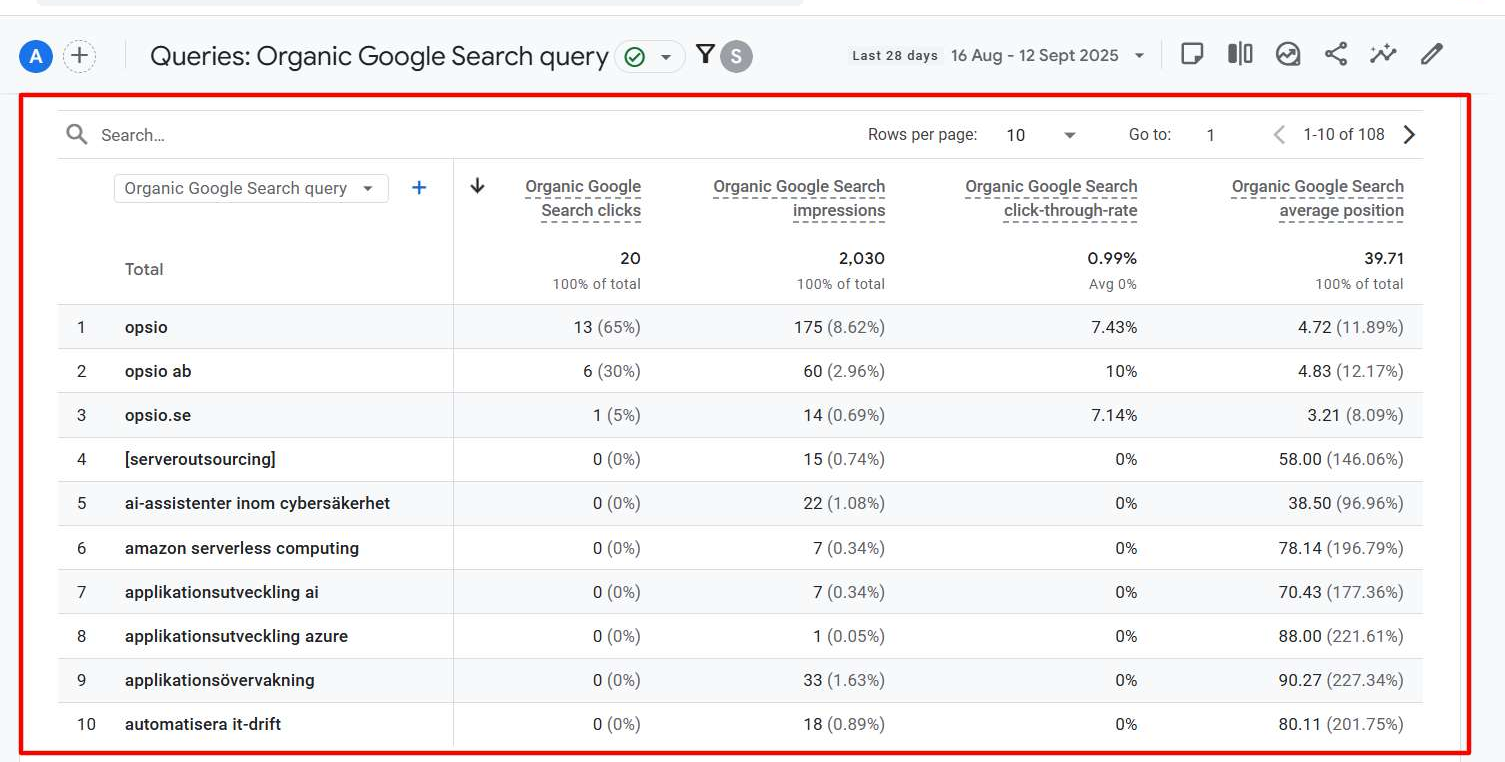
GA4 + Search Console, Opsio: organic Google search queries, clicks, impressions and position. 2,030 impressions and 20 clicks in four weeks, nearly all from brand searches; service terms appear on page four and beyond, a clear SEO target list.
GA4 User acquisition, Opsio: first user source with new and returning users. 3,072 new and 353 returning users; visitors also arrive from Microsoft Teams links and ChatGPT, so AI search is now a visible source.

Case study · Opsio

Opsio: Tracking Every Lead Action Across 70+ Service Pages

Location
Sweden
Campaign / setup
GA4 lead tracking via GTM
Period shown
Aug 16 – Sep 12, 2025
Sessions
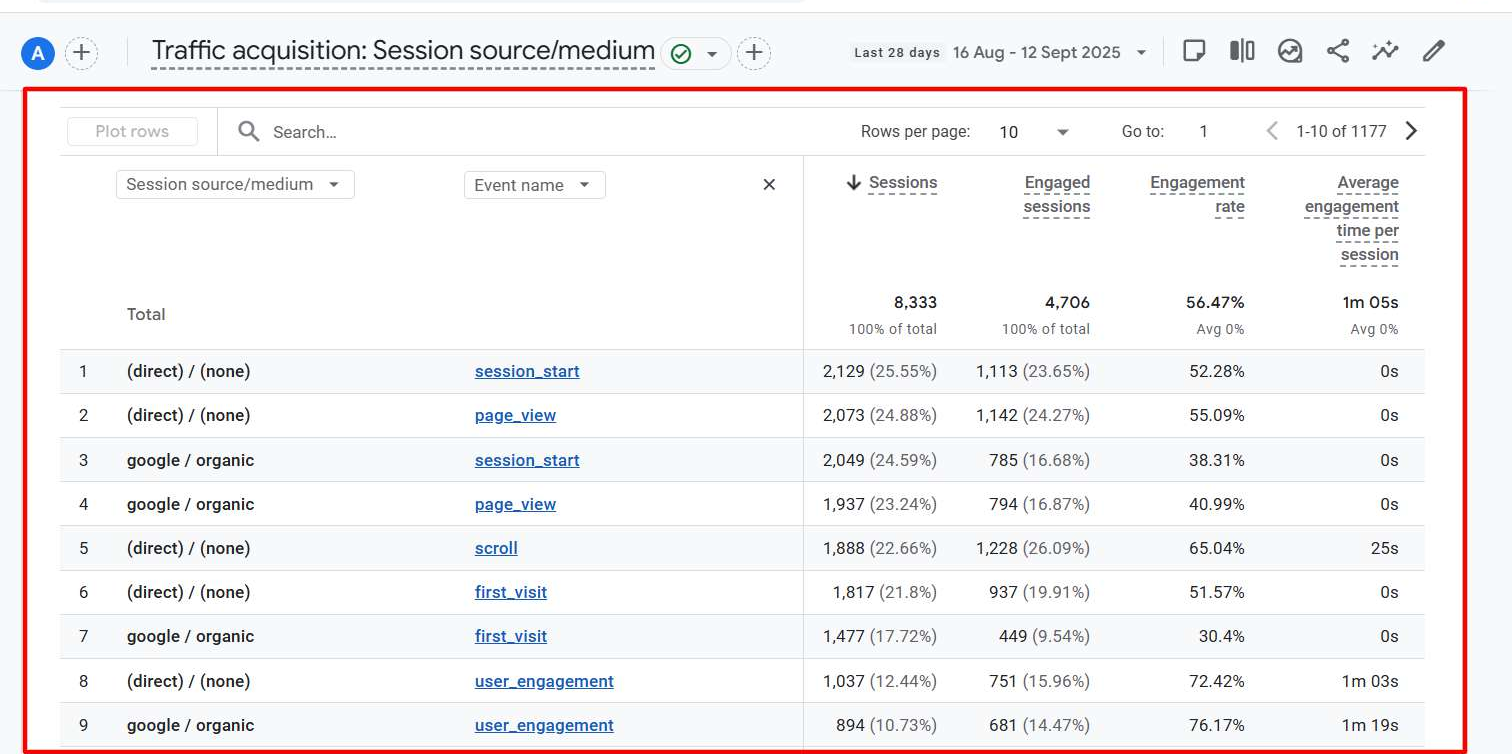
8,333
4,706 engaged
Engagement rate
56.5%
avg. across sources
Chatbot clicks
319
by 259 users
GA4 tags
70+
built in GTM
GA4 Traffic acquisition, Opsio: sessions and engagement by source and event

The goal

A cloud and IT services company with dozens of service pages, from AWS and Azure migration to cybersecurity and compliance, needed to know which services drew interest and which visits turned into enquiries. Standard GA4 only showed page views.

What I did

  • Built a GA4 tag in Google Tag Manager for every service page, grouped in folders.
  • Tracked contact, whitepaper and blog form submissions as lead events.
  • Added phone, email and chatbot click tracking, plus scroll depth.
  • Connected Search Console and verified everything in GA4 Realtime.

Result

The contact page reached 718 users, about 15% of all visitors, a clear measure of buying intent. The chatbot is a real lead channel: 319 clicks from 259 users in four weeks. Organic search is almost all brand searches: “opsio” brings 65% of organic clicks, while service searches rank around position 40.

Next step I recommended

Content and SEO for service keywords is the next growth step: service terms such as cloud migration or IT security already appear in Search Console, but on page four of results and beyond.

Scope of work

  • GA4 property and data stream setup
  • Google Tag Manager web container
  • Contact, whitepaper and blog form tracking
  • Phone, email and chatbot click tracking
  • Service page and landing page events
  • Scroll depth and engagement tracking
  • Key events (conversions) for leads
  • Search Console linking
  • Testing in GTM Preview and GA4 DebugView

Tools and platforms

  • Google Analytics 4
  • Google Tag Manager
  • Search Console
  • Google Ads
  • Looker Studio
  • Server-side GTM
  • Stape
  • HubSpot
  • WordPress
audit_requestedlead

Stop guessing. Start measuring what actually drives revenue.

Get a free audit of your tracking and ad accounts. You'll get a clear list of what's broken, what's missing and what to fix first — no obligation.