Skip to content
GrowthTag Solutions logoGrowthTag

Analytics & Tracking case study

X (Twitter) Pixel Setup Using GTM

X Ads can only optimize for sales it can see. I install the X Base Pixel and a dedicated event pixel for every step of the shopping funnel, so X can measure purchases, build retargeting audiences and find more buyers.

Industry
E-commerce brands
Category
Analytics & Tracking
Client accounts
5
5+
Stores set up
e-commerce brands
Up to 6
Funnel events
page view to purchase
Active
Event status
verified in X Ads
30 days
Attribution
post-engagement window

Results at a glance

Straight from the ad accounts

Every number below comes from the client's own dashboard, for the period shown on each case study.

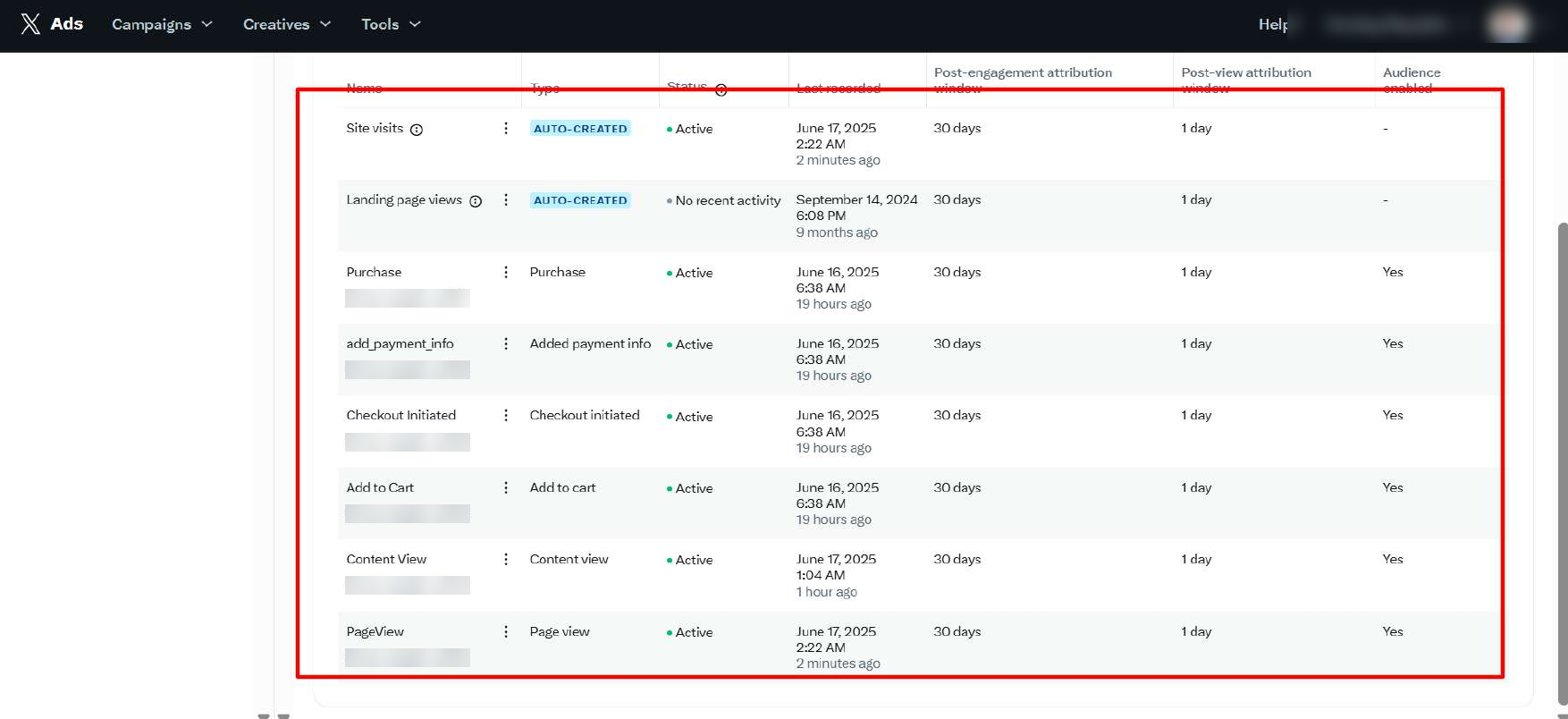
01Fashion brand (X Ads)X Pixel via GTMPage view to purchase, incl. payment info6 events Active
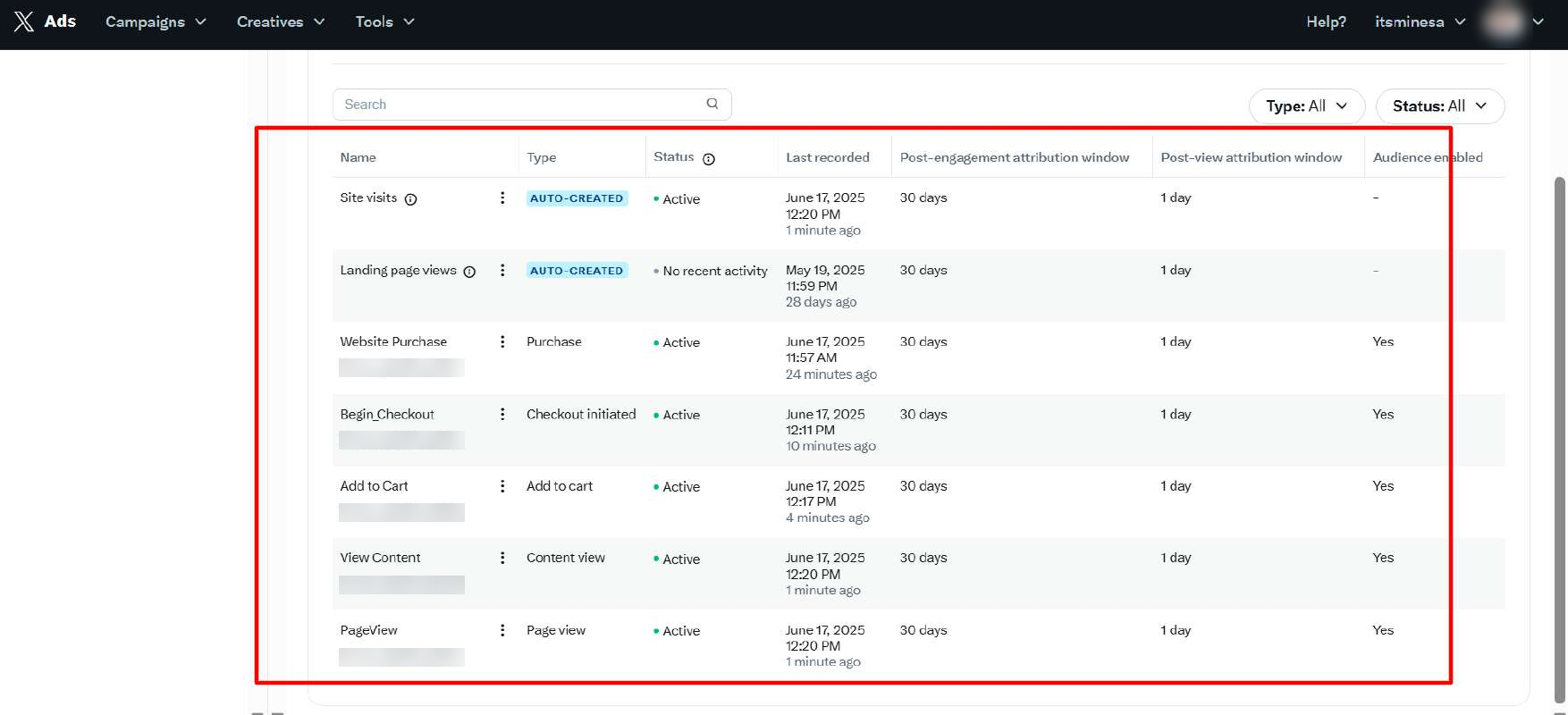
02ItsmineSaudi Arabia · X Pixel via GTMPage view, content view, cart, checkout, purchase5 events Active
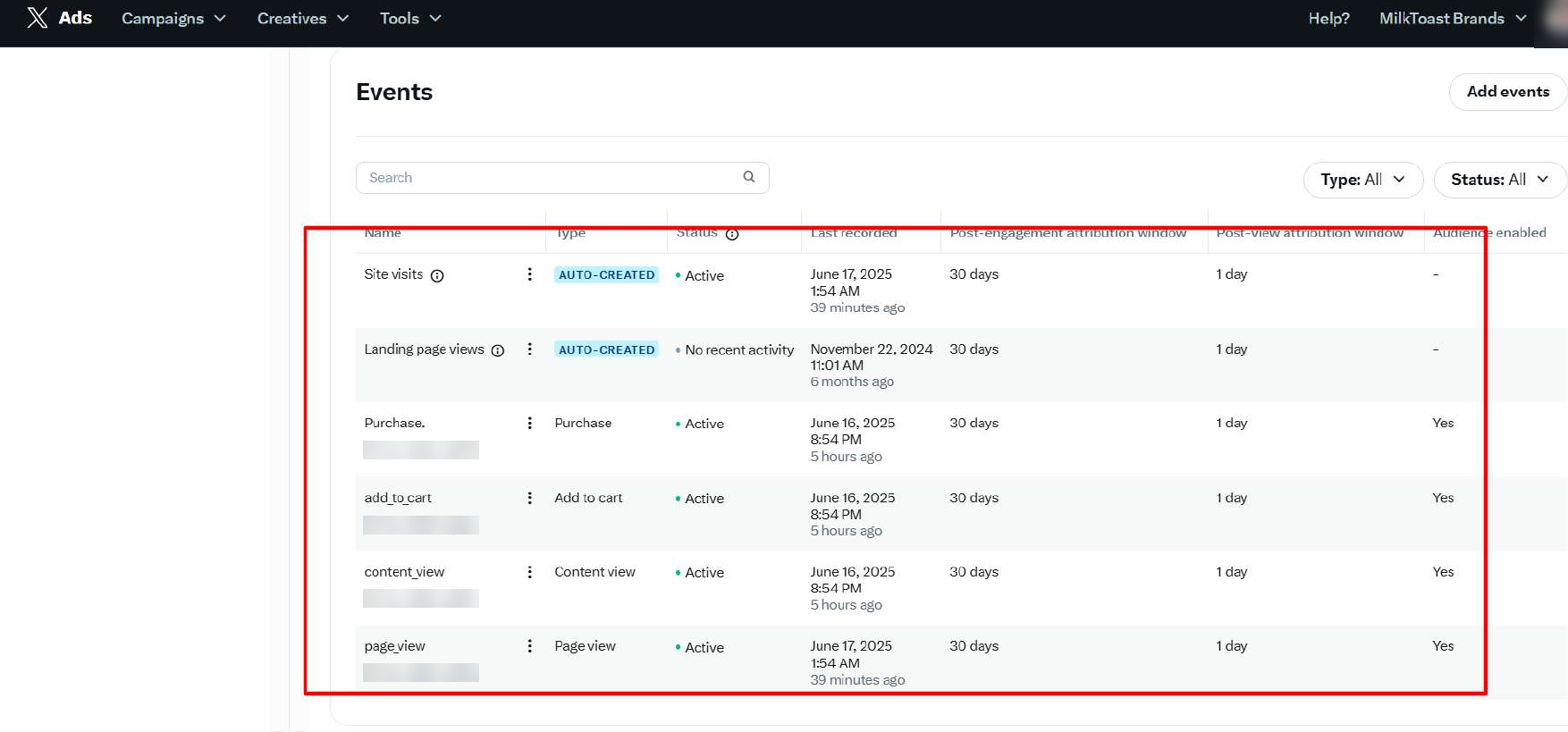
03MilkToast BrandsX Pixel via GTMPage view, content view, add to cart, purchase4 events Active
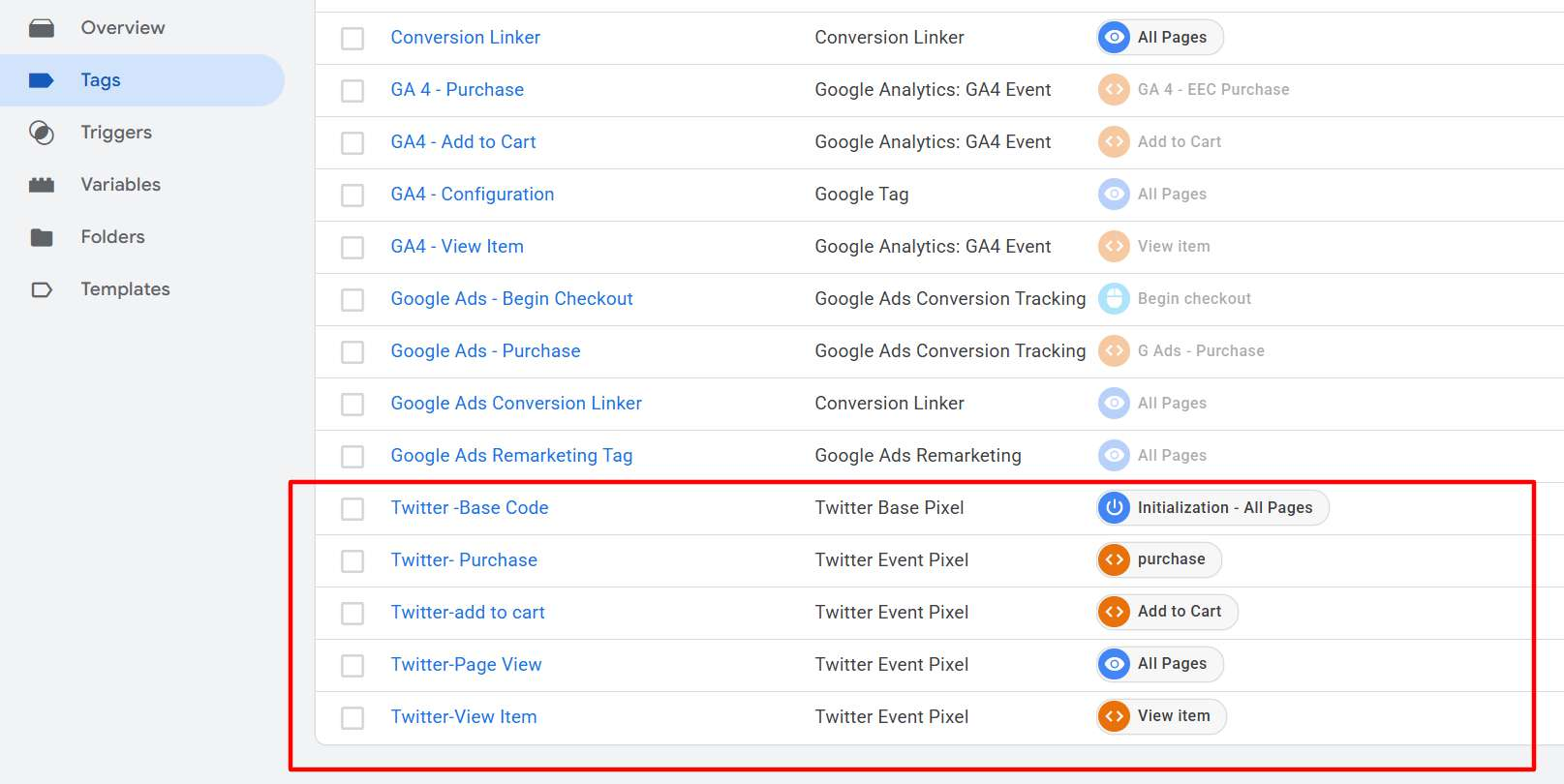
04Wide Awake ClothingGTM web containerPage view to purchase, incl. begin checkoutBuilt in GTM
05Bali NecklacesAlongside GA4Page view, content view, add to cart, purchase4 event tags

Taken from each client's X Ads Events Manager and Google Tag Manager, June 2025.

Context

Without the X Pixel, your X ads are flying blind

X Ads optimizes delivery toward the actions you report. With only clicks to go on, it can't tell a browser from a buyer, can't retarget people who left items in their cart, and can't show you which ads actually made sales.

  • Optimize for add to cart and purchase

    Instead of clicks and site visits, X reports purchases with order value per ad, so return on ad spend becomes measurable in X Ads Manager.

  • Audience-ready from day one

    Every event is set to build audiences, so you can retarget product viewers and cart abandoners, and exclude recent buyers, as soon as the pixel goes live.

  • Clean data

    One tag per event, tested before launch, instead of duplicate or missing events. The X Pixel sits in the same container as GA4, Google Ads, Meta and Snapchat, with no extra code on the site.

Method

How the setup works

  1. 1

    Base Pixel

    Fires on every page so X recognizes visitors who came from your ads.

  2. 2

    Event Pixels

    One tag per funnel step (page view, content view, add to cart, checkout initiated, added payment info, purchase), each with its own X event ID.

  3. 3

    Data layer

    Order value, currency and product IDs passed from the store.

  4. 4

    Verified

    Every event confirmed Active in X Ads Events Manager.

Proof

Built cleanly in Google Tag Manager

X Pixel tags built alongside GA4 and Google Ads in the same container
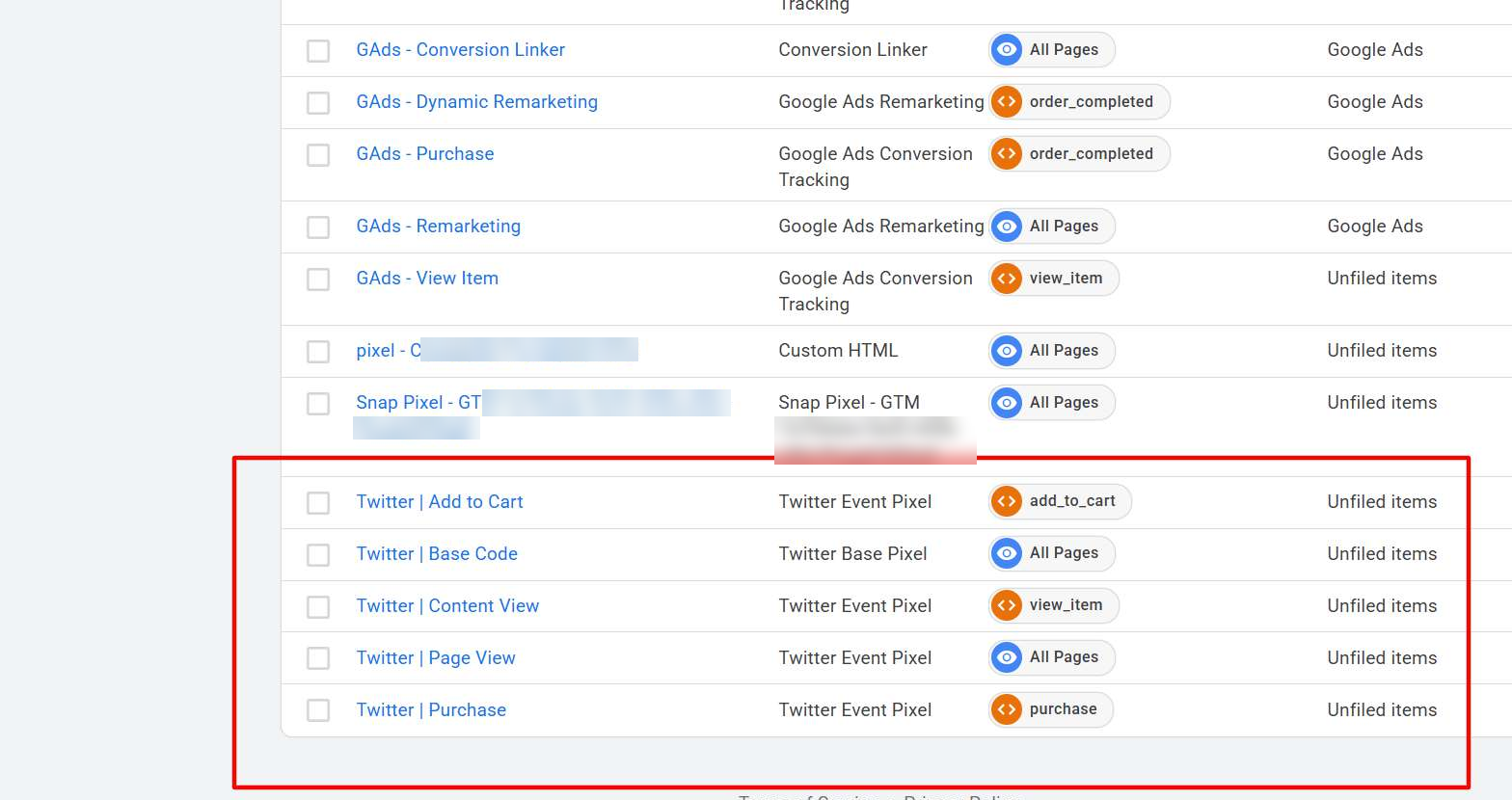
X Pixel tags alongside Google Ads remarketing and the Snap Pixel

Case study 01 · Fashion brand (X Ads)

Fashion brand: the full funnel, including payment info

Campaign / setup
X Pixel via GTM
Period shown
June 2025
Funnel events
6
all Active
Post-engagement window
30 days
1-day post-view
Audiences enabled
Yes
on every event
X Ads Events Manager, fashion brand: page view, content view, add to cart, checkout, payment info and purchase all Active, with audiences enabled

Result

Page view, content view, add to cart, checkout, payment info and purchase all Active in X Ads Events Manager, with audiences enabled on every event.

Scope of work

  • X Base Pixel via Google Tag Manager
  • Event Pixels for every funnel step
  • Purchase value, currency and product IDs
  • Audiences enabled on every event
  • Verification in X Ads Events Manager
Case study 02 · Itsmine

Itsmine: five funnel events recording live

Location
Saudi Arabia
Campaign / setup
X Pixel via GTM
Period shown
June 2025
Funnel events
5
all Active
Post-engagement window
30 days
1-day post-view
Audiences enabled
Yes
on every event
X Ads Events Manager, Itsmine: website purchase, checkout, add to cart, content view and page view, all Active

Result

Five funnel events recording live, each with a 30-day post-engagement and 1-day post-view attribution window and audiences enabled.

Scope of work

  • X Base Pixel via Google Tag Manager
  • Event Pixels for every funnel step
  • Audiences enabled on every event
  • Verification in X Ads Events Manager
Case study 03 · MilkToast Brands

MilkToast Brands: core purchase funnel tracked

Campaign / setup
X Pixel via GTM
Period shown
June 2025
Funnel events
4
all Active
Time to record
Minutes
after a visit
Audiences enabled
Yes
on every event
X Ads Events Manager, MilkToast Brands: purchase, add to cart, content view and page view, all Active

Result

Core purchase funnel tracked and recording within minutes of a visit. (Landing page views is an X auto-created event, not part of the setup.)

Scope of work

  • X Base Pixel via Google Tag Manager
  • Event Pixels for page view, content view, add to cart and purchase
  • Verification in X Ads Events Manager

Case study 04 · Wide Awake Clothing

Wide Awake Clothing: Base Pixel plus five event tags

Campaign / setup
GTM web container
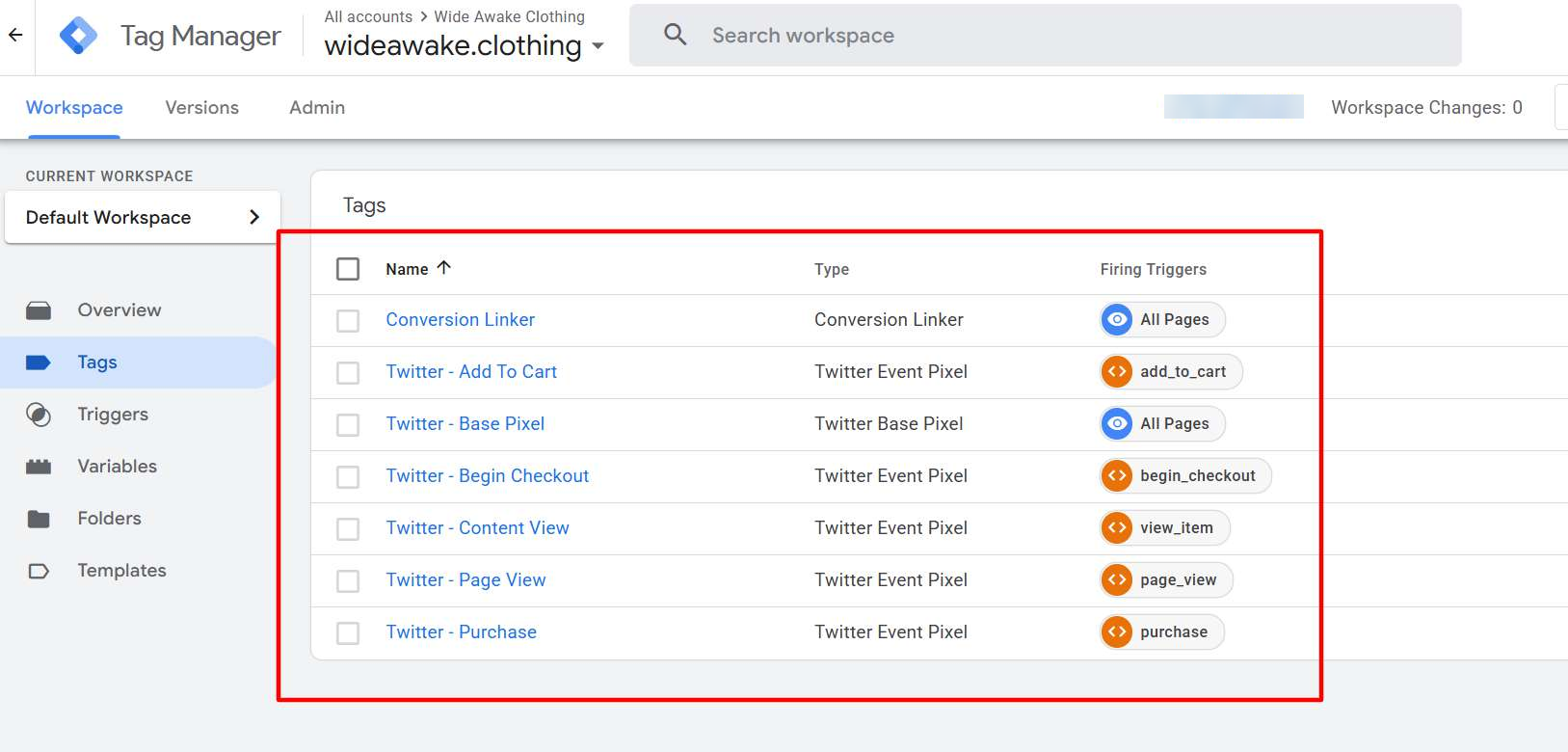
Wide Awake Clothing: Base Pixel plus five event tags, including begin checkout

Result

One Base Pixel on all pages and one clearly named event tag per action, including begin checkout, on the store's e-commerce triggers.

Scope of work

  • X Base Pixel via Google Tag Manager
  • Event Pixels for every funnel step
  • Testing in GTM Preview and X Pixel Helper

Case study 05 · Bali Necklaces

Bali Necklaces: X Pixel alongside GA4

Campaign / setup
Alongside GA4
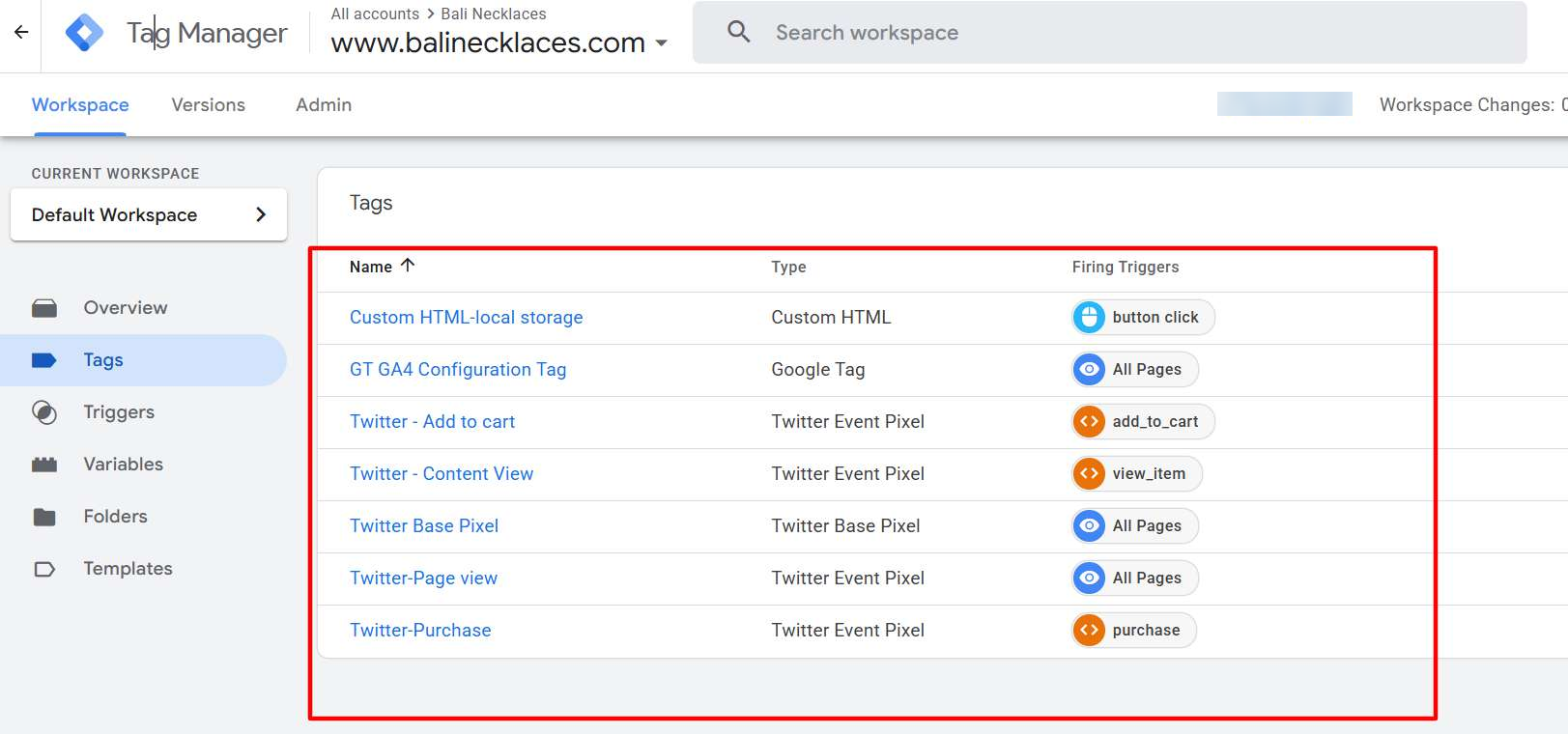
Bali Necklaces: Base Pixel and four event tags alongside GA4, plus a custom HTML helper tag

Result

Base Pixel and four event tags alongside GA4, plus a custom HTML helper tag, all in the same Tag Manager container.

Scope of work

  • X Base Pixel via Google Tag Manager
  • Event Pixels for page view, content view, add to cart and purchase
  • Testing in GTM Preview and X Pixel Helper

Tools and platforms

  • X Ads Manager
  • X Base Pixel
  • X Event Pixels
  • X Pixel Helper
  • Google Tag Manager
  • Shopify
  • WooCommerce
  • GA4
  • Meta Pixel
  • Snap Pixel
audit_requestedlead

Stop guessing. Start measuring what actually drives revenue.

Get a free audit of your tracking and ad accounts. You'll get a clear list of what's broken, what's missing and what to fix first — no obligation.