Skip to content
GrowthTag Solutions logoGrowthTag

Meta Ads case study

Meta Pixel Setup through Google Tag Manager

A US e-commerce store was running Meta Ads with real sales coming in, but Ads Manager reported almost nothing. My audit found several plugins each injecting their own Meta Pixel and their own e-commerce events. I rebuilt the whole measurement layer in one Google Tag Manager container. Two days later the client confirmed everything was matching.

Industry
E-commerce
Location
United States
Category
Meta Ads
5 / 5
Meta events live
verified before publishing
2 days
To client sign-off
numbers matched real orders
1 source
Owns every Meta event
one GTM container
7
Purchase parameters
value, currency, content IDs…

Context

What the audit found

“Our Business Manager isn’t showing conversions. Ad spend is very high and we’re getting nothing back.” — Store owner, before the audit. Spend was real. Orders were real. The reporting wasn’t. When Meta can’t read clean purchase events, the algorithm has nothing to optimise toward, so it keeps buying the wrong traffic and the cost per result climbs.

  • Several pixels from plugins

    Several plugins and apps were each installing their own copy of the Meta Pixel on the site.

  • Duplicate events

    The same action was being reported more than once, from more than one source.

  • Missing parameters

    E-commerce events were arriving with missing or inconsistent parameters — no reliable value, currency, or product IDs.

  • No single owner

    No single owner for the tracking, so every plugin update could break it again. Result: Meta could not match events to ad clicks, so conversions went uncounted.

Method

How I rebuilt it

  1. 1

    Audit the existing setup

    Mapped every script and plugin firing a Meta Pixel on the store, then matched them against what Meta was actually receiving in the dataset. This is where the duplicate and incomplete events showed up.

  2. 2

    Shut down the conflicting pixel sources

    Removed the plugin-level pixel injections so the dataset had one source of truth instead of several competing ones.

  3. 3

    Build the Meta event set in GTM

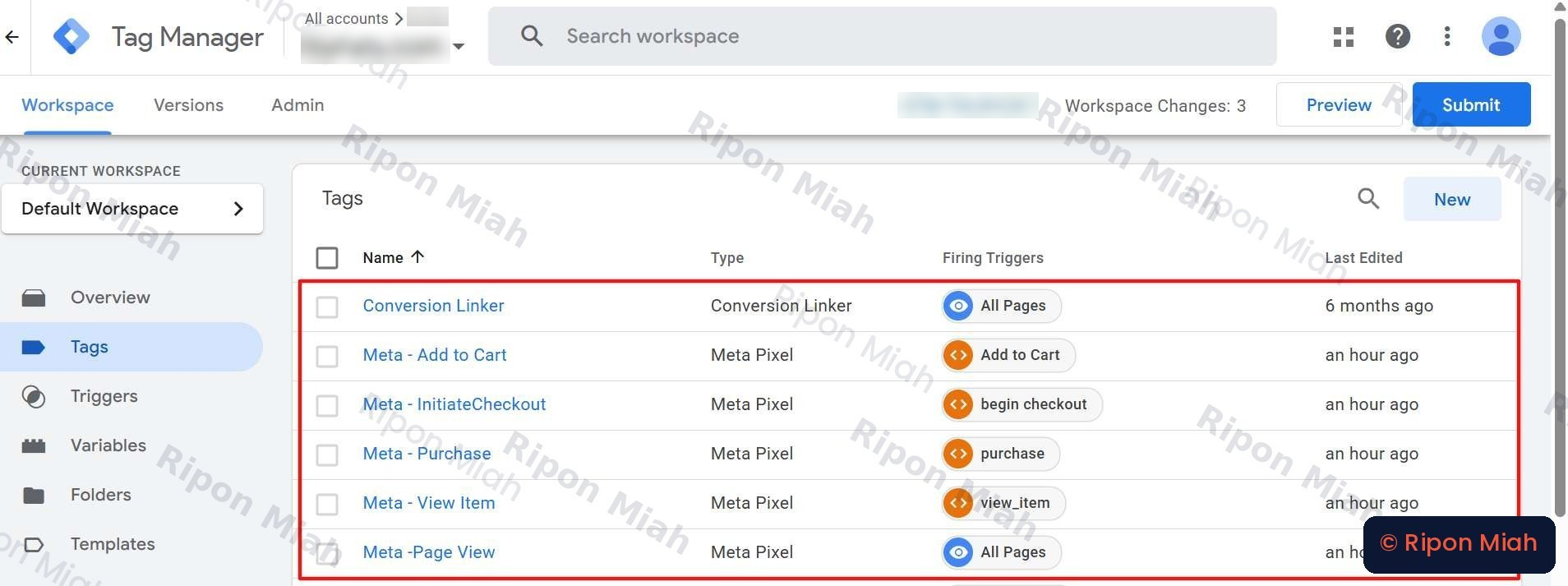
    One clean tag per standard e-commerce event (PageView, ViewContent, AddToCart, InitiateCheckout, Purchase), each on its own dataLayer trigger, plus a site-wide click-ID linker.

  4. 4

    Pass the full parameter set

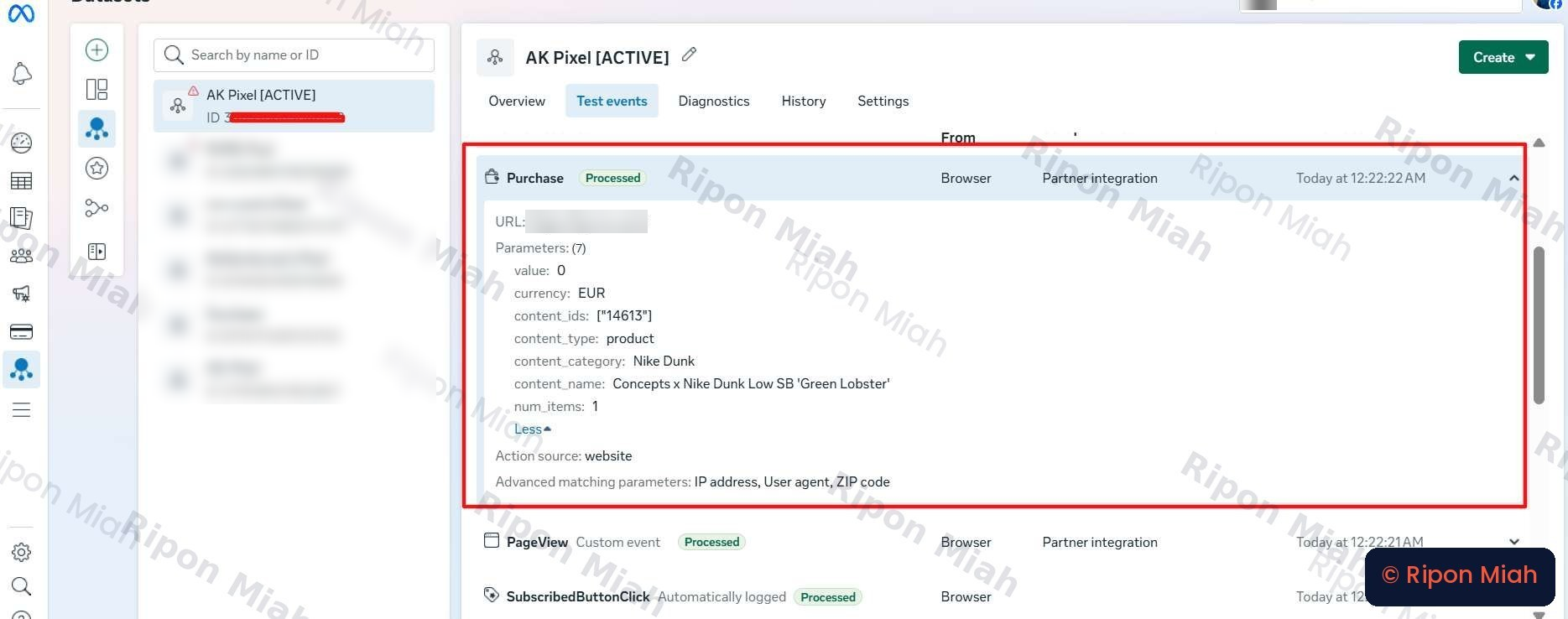
    Every event carries value, currency, content_ids, content_name, content_category, content_type and num_items, so Meta can attribute and value it.

  5. 5

    Verify before publishing

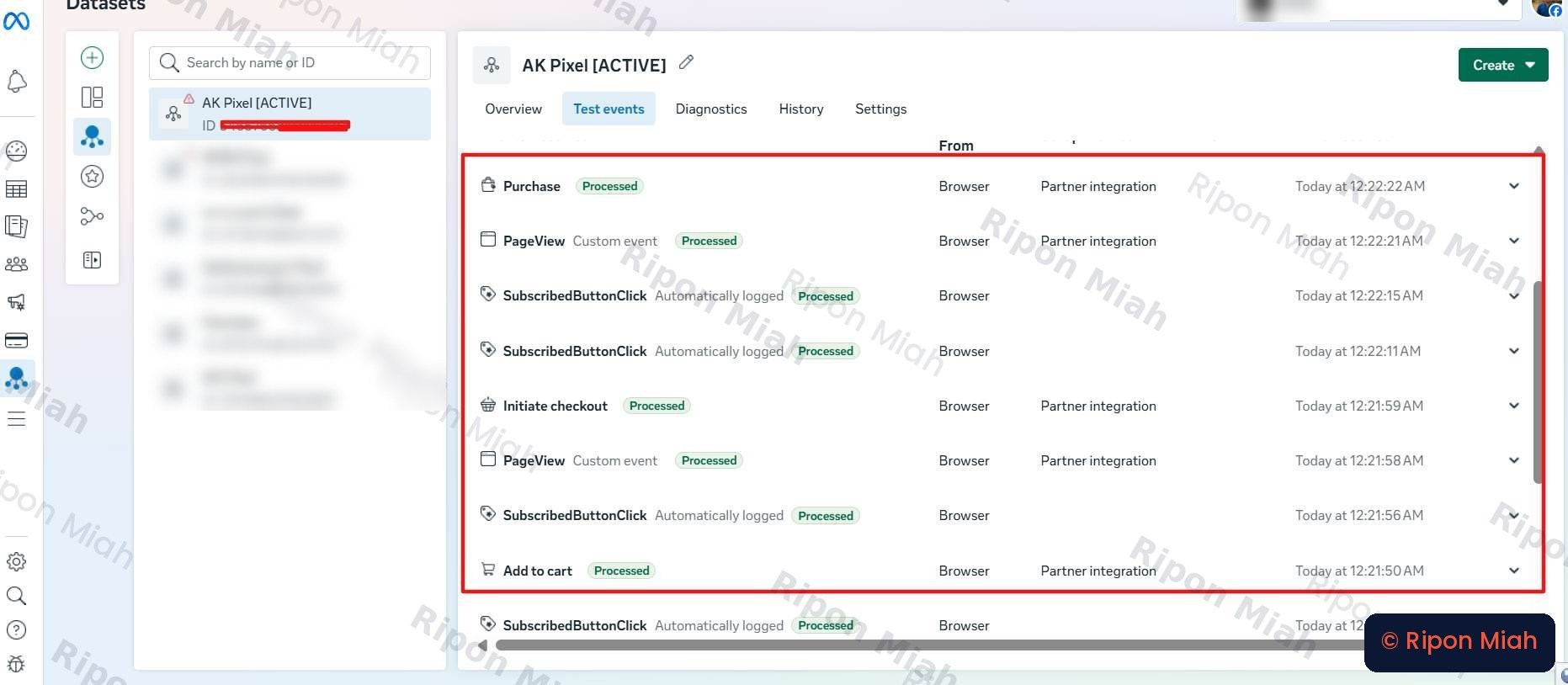
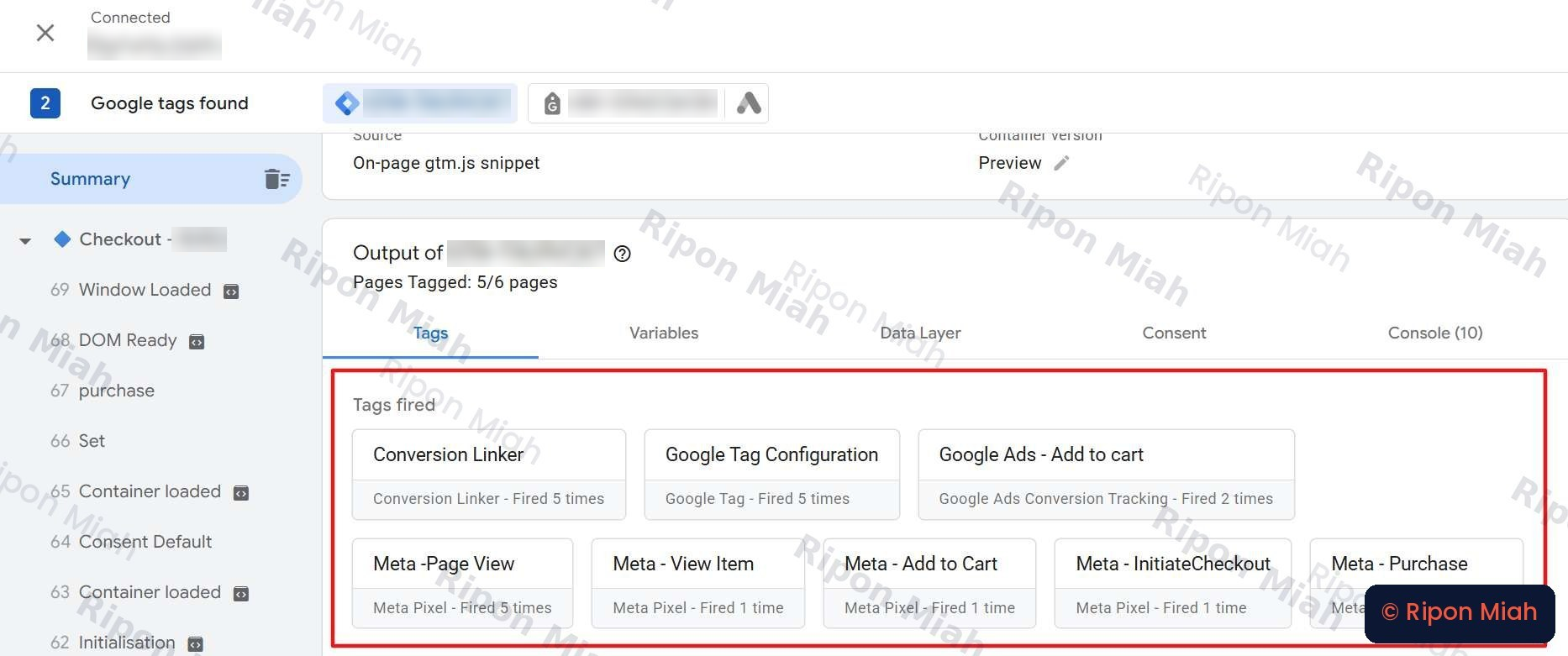
    Walked the full funnel in GTM Preview and watched the same journey land in Meta Test Events — every tag firing once, every event processed. Only then did the container go live.

Proof

Verified in Meta, before anything went live

Evidence 01 · Meta Events Manager → Test Events: one checkout journey, every event processed.
Evidence 02 · Purchase event detail: 7 parameters, action source website, advanced matching active.
Evidence 03 · Google Tag Manager workspace: Meta tags mapped one-to-one with dataLayer triggers.
Evidence 04 · GTM Preview → Tags fired: Purchase, InitiateCheckout, Add to Cart and View Item each fired once.

Case study · US e-commerce store

High ad spend, zero reported conversions — and the pixel was the reason

Location
United States
Campaign / setup
Pixel rebuild in GTM
Period shown
Sep 20 – Oct 19, 2026
Go-live to sign-off
2 days
Business Manager matched real orders
Every Meta event
1 source
owned by a single GTM container
Purchase events
Full signal
valued and attributed
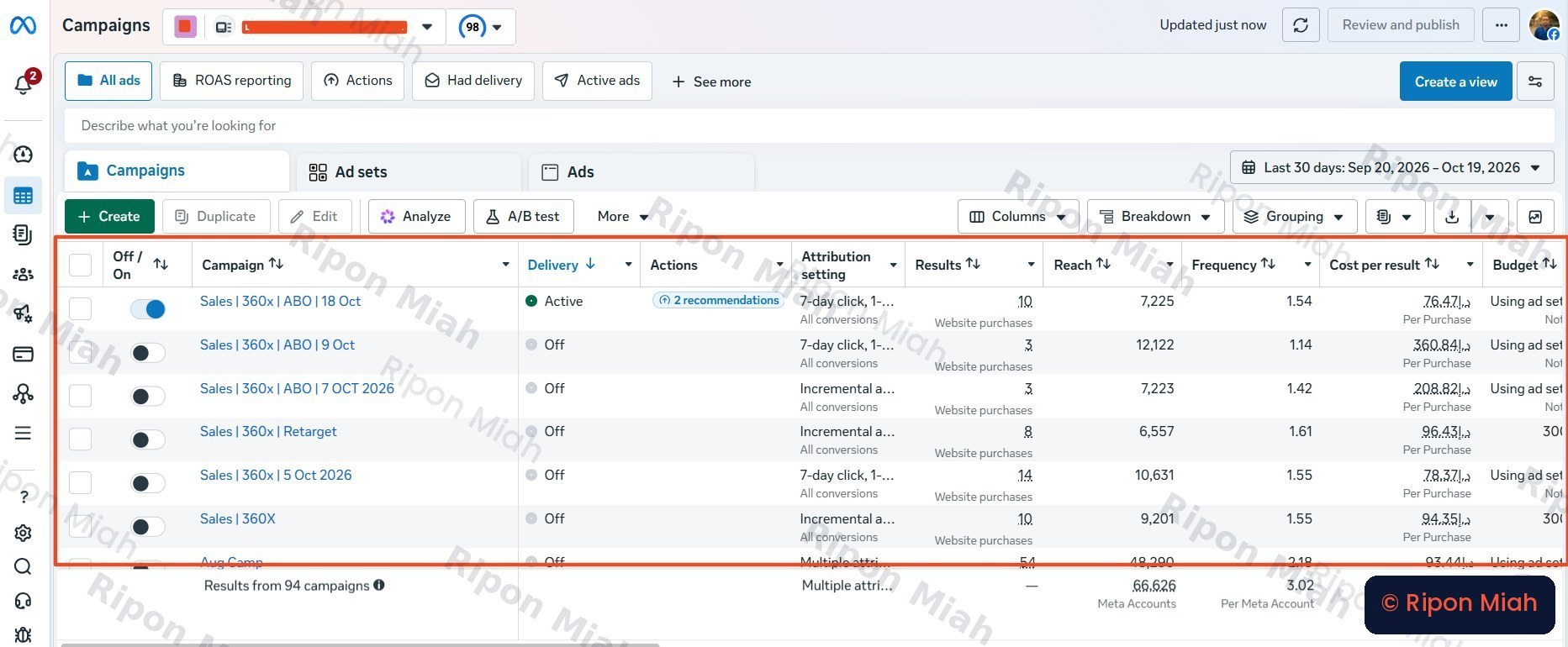
Meta Ads Manager → Campaigns, Sep 20 – Oct 19 2026: website purchases attributed per campaign.

The challenge

The store was spending heavily on Meta Ads and real orders were coming in, but Ads Manager reported almost nothing. Several plugins were each injecting their own Meta Pixel and their own e-commerce events, so Meta could not match events to ad clicks and conversions went uncounted.

What I did

  • One Google Tag Manager container owning every Meta event on the site.
  • Each event fires exactly once, from a dataLayer trigger tied to the real user action.
  • Full standard parameters on every event, so Meta can value and attribute each order.
  • Click-ID linking and Advanced Matching in place to improve match quality.
  • Tested in GTM Preview and Meta Test Events before anything went live.

Result

Every campaign now reports Website purchases with a cost per purchase attached to it — the columns that sat empty while the pixel was broken. Two days after go-live the client confirmed their Business Manager numbers matched their real orders: “Everything is correct now.”

Scope of work

  • Pixel audit
  • Plugin pixel removal
  • Meta Pixel via GTM
  • E-commerce events (PageView → Purchase)
  • Full event parameters
  • Click-ID linking & Advanced Matching
  • Testing & validation

Tools and platforms

  • Google Tag Manager
  • Meta Pixel
  • Meta Events Manager
  • Meta Test Events
  • GTM Preview
  • dataLayer
  • Advanced Matching
audit_requestedlead

Stop guessing. Start measuring what actually drives revenue.

Get a free audit of your tracking and ad accounts. You'll get a clear list of what's broken, what's missing and what to fix first — no obligation.