Skip to content
GrowthTag Solutions logoGrowthTag

Google Ads case study

Google Ads Enhanced Conversion Tracking

Google Ads can only optimize for the conversions it can see. Across e-commerce and lead-generation accounts, I build tracking that records every purchase, checkout and lead accurately, so Smart Bidding works on real data.

Industry
E-commerce & lead generation
Category
Google Ads
Client accounts
4
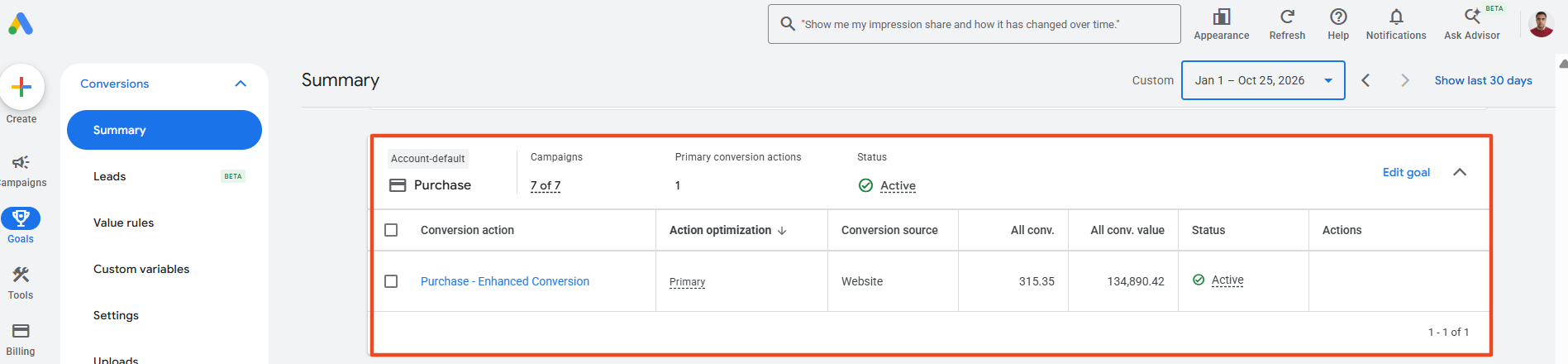
315
Purchases tracked
Enhanced Conversion, Jan – Oct 2026
134,890
Conversion value
all conversion value
7 of 7
Campaigns
bidding on this goal
Active
Status
primary conversion action
E-commerce store: Purchase – Enhanced Conversion, Google Ads Conversions summary, Jan 1 – Oct 25, 2026

Results at a glance

Straight from the ad accounts

Every number below comes from the client's own dashboard, for the period shown on each case study.

01Cold Culture ShopGTM + Enhanced Conversions171 conversions in 4 weeksfrom 0
02High-volume e-commerce storeEnhanced Conversions1,112 purchases trackedin 4 weeks
03Lead generation businessWebsite form via GTM5 leads in 12 daysfrom 0
04Consultation serviceEnhanced Conv. for Leads173 booked consultations~14 per day

Conversion values are shown in each account's own currency.

Context

Why conversion tracking makes or breaks Google Ads

Every Smart Bidding strategy, from Maximize Conversions to Target ROAS, learns from the conversions you report. If purchases are missed, double-counted or recorded without their value, Google spends your budget on the wrong clicks, and your reports can't be trusted. These are the problems I fix first in every account.

  • Smart Bidding learns from it

    Google decides who sees your ads based on who converted before. Missing or wrong conversions mean it optimizes toward the wrong people.

  • Enhanced Conversions fill the gaps

    Hashed first-party data from your checkout or form, such as email and phone, helps Google match conversions that cookies miss because of browser privacy limits.

  • The right goals steer bidding

    Only real outcomes, purchases and leads, should drive bidding. Steps like add to cart are tracked as secondary signals for insight, not optimization.

Proof

Two ways I build it

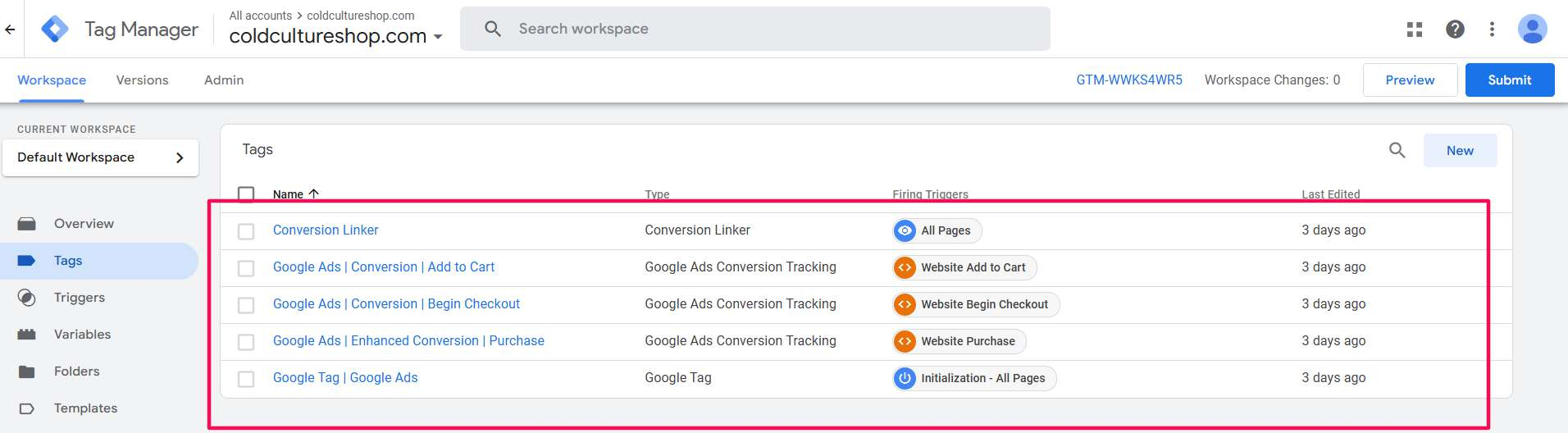
Web GTM setup, coldcultureshop.com: Google Tag, Conversion Linker and a tag for each funnel step
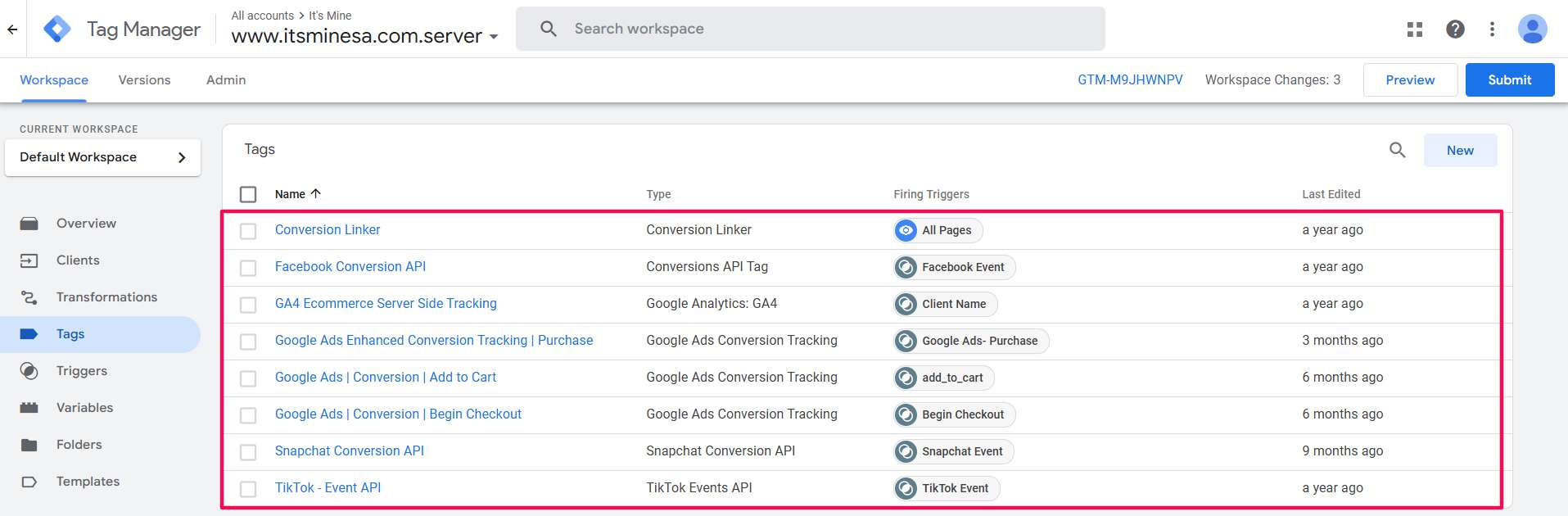
Server-side GTM setup, itsminesa.com: Google Ads Enhanced Conversions alongside Meta, GA4, Snapchat and TikTok

Case study 01 · Cold Culture Shop

Rebuilding E-commerce Conversion Tracking from Zero

Campaign / setup
GTM + Enhanced Conversions
Period shown
Dec 16, 2024 – Jan 12, 2025
Conversions tracked
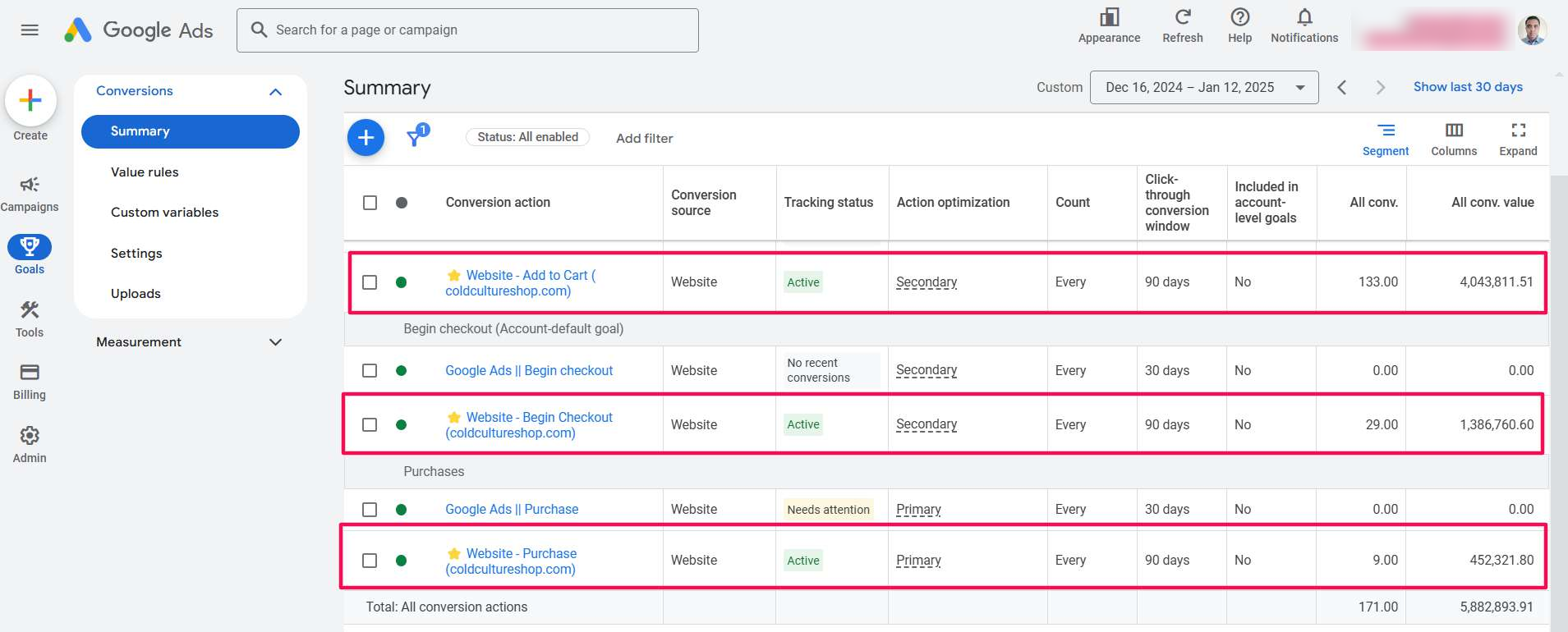
171
in four weeks
Purchases
9
value 452,321.80
Begin checkouts
29
secondary action
Add to carts
133
secondary action
Google Ads, Conversions summary, Dec 16, 2024 – Jan 12, 2025 (values in account currency)

The challenge

The account's existing conversion actions weren't working. The old Purchase action showed “Needs attention” and the old Begin Checkout action had no recent conversions, so the most important actions in the account were recording nothing and Google had no real signal to bid on.

What I did

  • Set up the Google Tag and Conversion Linker through Google Tag Manager on every page.
  • Built separate conversion tags for Add to Cart, Begin Checkout and Purchase, each on its own trigger.
  • Enabled Enhanced Conversions on Purchase and passed the real order value.
  • Set Purchase as primary and the funnel steps as secondary, then tested every tag in GTM Preview.

Result

All three new actions are Active: 171 conversions tracked in four weeks, including 9 purchases worth 452,321.80 in recorded value, 29 checkouts and 133 add to carts. The old broken actions recorded zero over the same period.

Scope of work

  • Google Tag & Conversion Linker
  • GTM conversion tags
  • Add to Cart / Begin Checkout / Purchase
  • Enhanced Conversions
  • Dynamic order value
  • Primary & secondary goals
  • Testing & validation

Case study 02 · High-volume e-commerce store

Enhanced Conversions at Scale: 1,112 Purchases in Four Weeks

Campaign / setup
Enhanced Conversions
Period shown
Dec 16, 2024 – Jan 12, 2025
Purchases
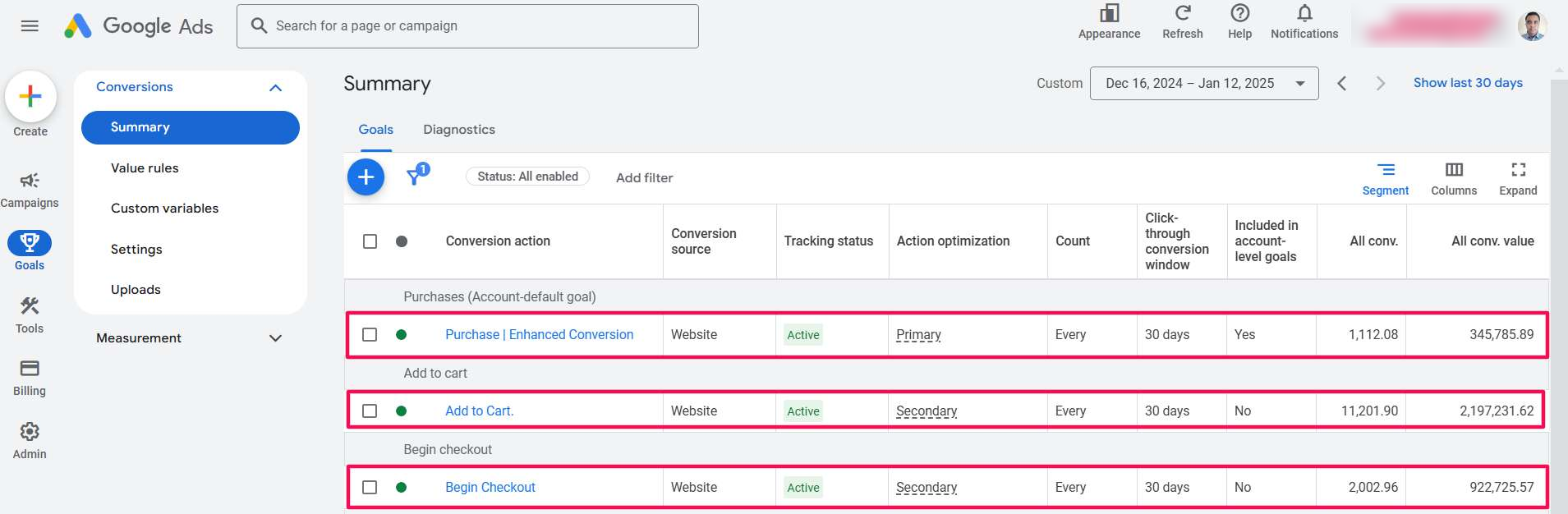
1,112
Enhanced Conversion
Purchase value
345,786
recorded value
Begin checkouts
2,003
secondary action
Add to carts
11,202
secondary action
Google Ads, Conversions summary, Dec 16, 2024 – Jan 12, 2025 (values in account currency)

The starting point

A high-volume store needed every purchase recorded with its value, so Smart Bidding could scale on real revenue rather than estimates. The full funnel also had to be measured without diluting the bidding signal.

What I did

  • Implemented Purchase tracking with Enhanced Conversions as the primary action, included in account-level goals.
  • Tracked Add to Cart and Begin Checkout as secondary actions for funnel insight.
  • Passed the real order value with every purchase.
  • Validated each action until all three showed Active.

Result

1,112 purchases tracked in four weeks, with 345,785.89 in recorded purchase value, plus 2,003 checkouts and 11,202 add to carts as secondary signals. Bidding optimizes on purchases only, while the whole funnel stays visible.

Scope of work

  • Google Tag & Conversion Linker
  • GTM conversion tags
  • Add to Cart / Begin Checkout / Purchase
  • Enhanced Conversions
  • Dynamic order value
  • Primary & secondary goals
  • Testing & validation

Case study 03 · Lead generation business

Lead Form Tracking That Counts Every Consultation Request

Campaign / setup
Website form via GTM
Period shown
Jan 1 – 12, 2025
Leads tracked
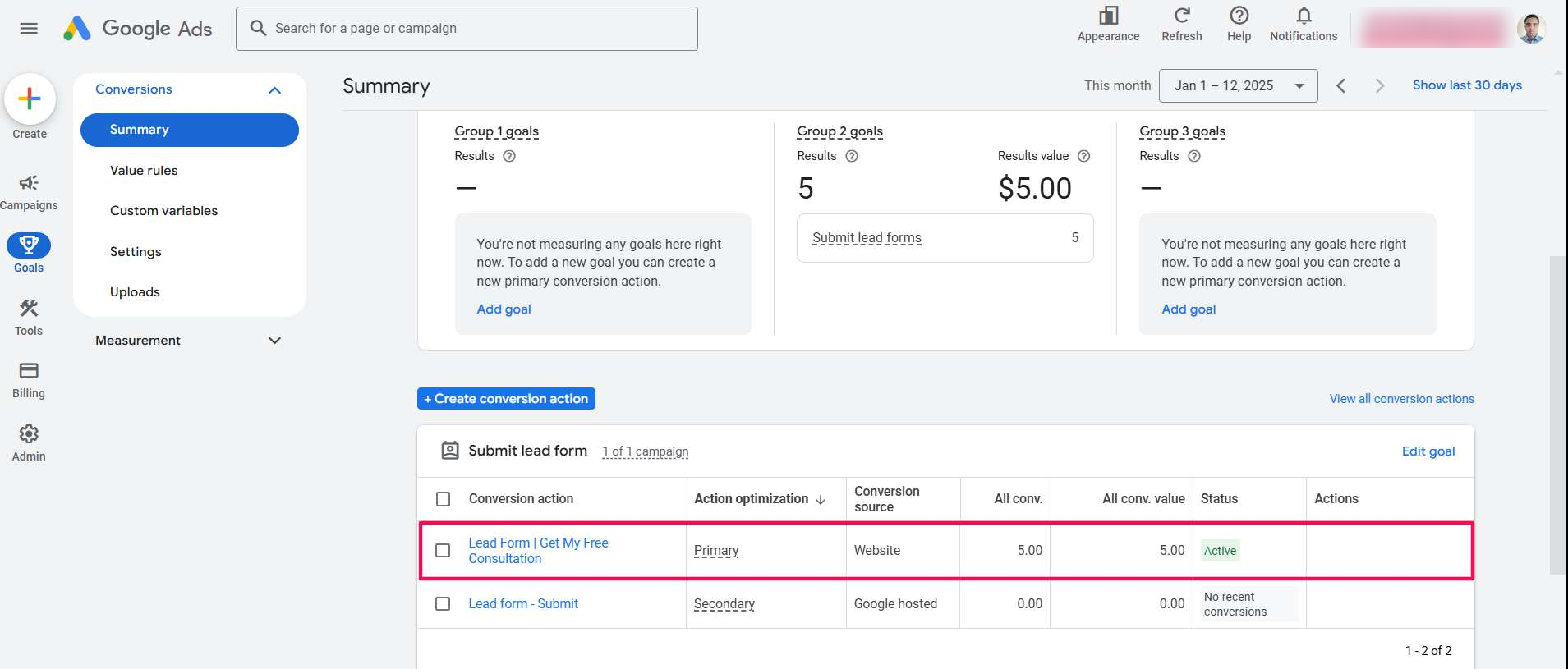
5
in the first 12 days
Old action
0
Google-hosted form
Goal
Primary
submit lead form
Status
Active
1 of 1 campaign
Google Ads, Conversions summary, Jan 1 – 12, 2025

The challenge

The account relied on a Google-hosted lead form action that showed “No recent conversions”. Free consultation requests weren't reaching Google Ads as conversions, so the campaign had no lead signal to optimize toward.

What I did

  • Created a website conversion action for the “Get My Free Consultation” form.
  • Built the form-submission tag and trigger in Google Tag Manager.
  • Set it as the primary conversion for the lead form goal used by the campaign.
  • Tested submissions end to end and confirmed the action shows Active.

Result

The new website lead form action is Active and recorded 5 consultation requests in the first 12 days, while the old Google-hosted action recorded none. The campaign now bids toward real leads.

Scope of work

  • Lead form conversion setup
  • GTM tag & trigger
  • Primary goal configuration
  • Testing & validation

Case study 04 · Consultation service

Enhanced Conversions for Leads: 173 Bookings in 12 Days

Campaign / setup
Enhanced Conv. for Leads
Period shown
Jan 1 – 12, 2025
Booked consultations
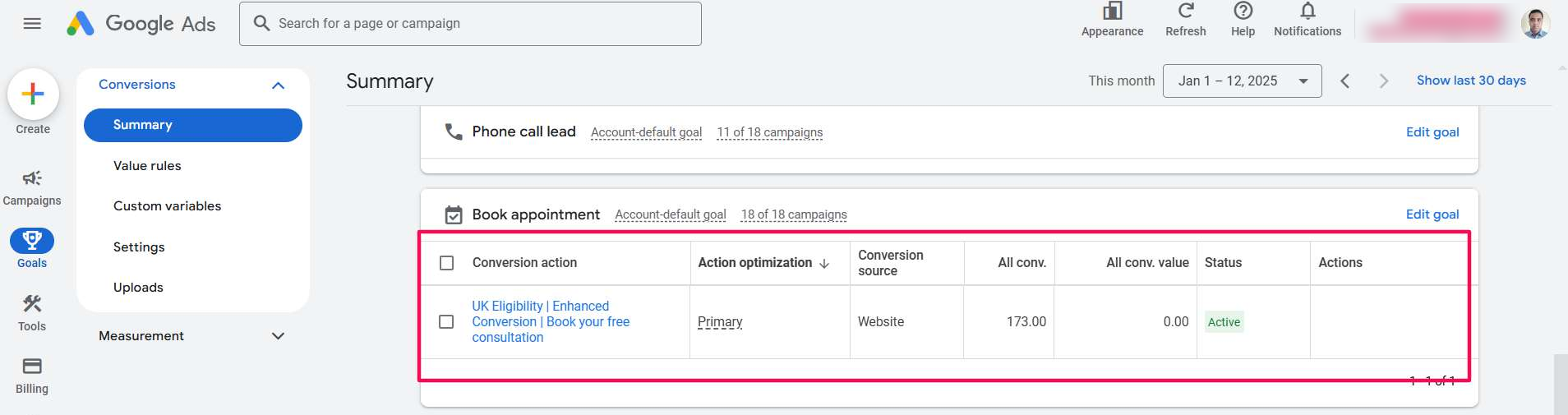
173
in 12 days
Per day
~14
average bookings
Campaigns
18 of 18
account-default goal
Status
Active
primary action
Google Ads, Conversions summary, Jan 1 – 12, 2025

The starting point

A consultation business running 18 campaigns needed one clear, reliable signal: a booked free consultation. Without it, every campaign would optimize toward clicks rather than appointments.

What I did

  • Built the “Book your free consultation” conversion through Google Tag Manager.
  • Enabled Enhanced Conversions for Leads, sending hashed lead details for stronger matching.
  • Set it as the primary action of the account-default Book appointment goal, so all 18 campaigns optimize on it.
  • Verified the action end to end until it showed Active.

Result

173 booked consultations tracked in the first 12 days of January 2025, about 14 a day, with the goal applied across all 18 of 18 campaigns.

Scope of work

  • Lead conversion setup
  • GTM tag & trigger
  • Enhanced Conversions for Leads
  • Primary goal configuration
  • Testing & validation

Tools and platforms

  • Google Ads
  • Google Tag Manager
  • Google Tag
  • Conversion Linker
  • Enhanced Conversions
  • Enhanced Conversions for Leads
  • Server-side GTM
  • Stape
  • GA4
audit_requestedlead

Stop guessing. Start measuring what actually drives revenue.

Get a free audit of your tracking and ad accounts. You'll get a clear list of what's broken, what's missing and what to fix first — no obligation.